
How to Price Your Digital Products (Without Leaving Money on the Table)
6 months ago · 14 min read
Pricing is one of those things that feels like it should be simple but trips up almost every digital product creator. You either price too low and leave money on the table, or price too high and wonder why nobody's buying. And the worst part? Most pricing advice is vague. "Charge what you're worth." Cool, but what does that actually mean in practice?
This guide gives you a concrete framework for pricing digital products. Not theory. Not motivational advice. Actual strategies you can use today to figure out what to charge, how to structure your pricing, and how to increase your revenue without creating more products.
Why Most Creators Underprice Their Products
Let's start with the uncomfortable truth: you're probably charging too little. Almost every digital product creator starts by underpricing, and most never correct it. Here's why this happens:
- You compare to your cost, not your value. A Canva template takes you 2 hours to make, so charging $30 feels crazy. But the customer isn't paying for your 2 hours. They're paying for their 20 hours saved, plus the professional result they couldn't create themselves.
- Imposter syndrome. "Who am I to charge $49 for a template?" You are someone who solved a real problem. That's who. Your product's value doesn't depend on your job title or follower count.
- Fear of no sales. A $5 product feels safe because "anyone can afford it." But low prices attract low-commitment buyers who are more likely to refund, leave bad reviews, and never become repeat customers.
- You see what competitors charge and match them. If everyone else charges $10, you assume $10 is correct. But what if everyone else is also underpricing? In many niches, that's exactly what's happening.
The Value-Based Pricing Framework
Here's the framework that actually works for digital products. Instead of asking "what should I charge?" ask these three questions:
- What result does my product deliver? Be specific. Not "it helps with budgeting" but "it saves the customer 3 hours per week on financial tracking and helps them identify where they're overspending."
- What is that result worth to the customer? If your template saves someone 3 hours per week and their time is worth $30/hour, that's $90/week in value. Even at $49 one-time, your product pays for itself in 4 days.
- What alternatives does the customer have? If the alternative is hiring a designer for $500 or spending 15 hours learning to do it themselves, your $79 template pack is a bargain by comparison.
This is value-based pricing, and it completely changes how you think about your numbers. You stop anchoring to what it cost you to make and start anchoring to what it's worth to the buyer.
Price Ranges That Work for Different Digital Products
Here are realistic price ranges based on what's actually selling in 2026. These aren't theoretical. They're based on what successful creators are charging:
| Product Type | Entry Price | Mid-Range | Premium |
|---|---|---|---|
| Single template | $5-15 | $15-35 | $35-79 |
| Template bundle (5-10) | $19-39 | $39-79 | $79-149 |
| Ebook / guide | $9-19 | $19-39 | $39-79 |
| Mini course (under 2 hrs) | $19-49 | $49-99 | $99-199 |
| Full course (5+ hrs) | $49-99 | $99-299 | $299-999 |
| Preset / filter pack | $9-19 | $19-49 | $49-99 |
| Printable bundle | $7-15 | $15-29 | $29-49 |
| Software tool / plugin | $19-49 | $49-149 | $149-499 |
Notice the range. A template can sell for $5 or $79 depending on how it's positioned, what's included, and who it's for. The product itself matters less than how you frame it and what audience you're selling to. A budget template for college students and a financial model for startup founders could be structurally identical, but the second one can command 10x the price.
The Psychology of Pricing (What Actually Makes People Buy)
Pricing isn't just math. It's psychology. Here are the principles that consistently increase conversions:
- Charm pricing works. $29 converts better than $30. $47 converts better than $50. It sounds silly, but decades of research confirms it. Use prices ending in 7 or 9 for most digital products.
- Anchoring changes perception. If your sales page shows a $199 course crossed out with a $79 launch price, the $79 feels like a steal. Without the anchor, $79 might feel expensive. Always give context for your price.
- Round numbers signal premium. Charm pricing works for most products, but if you're positioning something as luxury or high-end, round numbers ($100, $500) actually work better. They signal quality and confidence.
- Decoy pricing increases upgrades. Offer three tiers: Basic ($19), Standard ($49), Premium ($79). Most people pick the middle option. Now make it $19, $49, $59. Suddenly Premium looks like a no-brainer for just $10 more than Standard, and most people pick Premium instead.
- Free trials kill conversions for digital products. Unlike SaaS, digital products don't need trials. Once someone has the free version, their motivation to buy drops dramatically. Instead, use free lead magnets that complement your paid product rather than replace it.
How to Structure Your Pricing Tiers
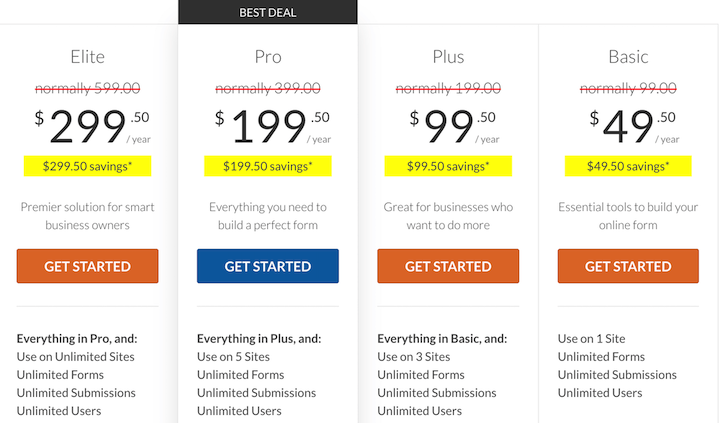
Single-price products are fine, but tiered pricing almost always makes more money. Here's how to structure tiers that work:
- Tier 1 (Basic): the core product at your baseline price. This should be genuinely useful on its own. It's your entry point and it's what most comparison shoppers will evaluate you against.
- Tier 2 (Standard/Plus): the core product plus extras. Additional templates, bonus resources, video walkthrough, or extended license. Price this 2-2.5x the basic tier. This is your money-maker because most people pick the middle option.
- Tier 3 (Premium/Pro): everything in Standard plus high-value additions. Personal feedback, extended support, commercial license, or access to future updates. Price this 1.5-2x the Standard tier. Fewer people buy it, but those who do are your best customers.
The key is making each tier feel like an obvious step up. The gap between Basic and Standard should feel like a no-brainer upgrade. And Premium should include at least one thing that Standard doesn't have that your most serious customers really want.
Bundle Pricing: The Easiest Way to Increase Revenue
Bundles are the single most effective pricing strategy for digital product creators. Here's why they work so well:
- Higher perceived value. "5 templates for $39" feels like a better deal than "1 template for $15" even though the per-item price is similar. Customers love feeling like they got a deal.
- Higher average order value. Instead of selling one $15 product, you sell one $39 bundle. That's 2.6x more revenue per transaction with zero additional customer acquisition cost.
- Reduced decision fatigue. Instead of choosing between 5 individual products, the customer just buys the bundle and gets everything. Easier decision, faster checkout, more revenue.
A bundle strategy that works incredibly well: price individual products at full price ($15 each), then offer a bundle of all 5 for $39 (save 48%). Most customers will pick the bundle. You make more per sale, they feel like they got a bargain. Everyone wins.
How Platform Fees Affect Your Pricing
This is something most pricing guides ignore, but platform fees directly impact your margins and should influence your pricing decisions. Here's how the math works:
| Platform | Your Price | Fees Taken | You Keep |
|---|---|---|---|
| Storelib (Free plan) | $30 | $2.05 (6% + $0.25) | $27.95 |
| Storelib (Growth, $29/mo) | $30 | $1.15 (3% + $0.25) | $28.85 |
| Storelib (Pro, $99/mo) | $30 | $0.70 (1.5% + $0.25) | $29.30 |
| Gumroad | $30 | $3.00 (10%) | $27.00 |
| Shopify | $30 | $1.17 (2.9% + $0.30) | $28.83 (+ $39/mo) |
At low volumes, the difference between platforms seems small. But it compounds fast. If you sell 200 units per month at $30, the difference between a 10% platform fee and a 1.5% + $0.25 fee is over $400/month. That's almost $5,000/year staying in your pocket instead of going to a platform.
This is why platform choice matters for pricing strategy. On a high-fee platform, you might need to price higher just to maintain the same margins. On a lower-fee platform like Storelib, you have more flexibility to experiment with pricing, run promotions, and still stay profitable.
When and How to Raise Your Prices
Raising prices is one of the scariest things for new creators, but it's also one of the highest-impact moves you can make. Here are the signs it's time to raise:
- You're consistently selling out or hitting your sales goals. If demand is strong, your price is probably too low. Raise it 20-30% and see what happens.
- You have positive reviews and testimonials. Social proof justifies higher prices. If customers are raving about your product, you've earned the right to charge more.
- You've added features or content since launch. Your product is better now than when you launched it. Update the price to reflect that.
- Competitors with similar products charge more. If comparable products sell for $49 and yours is $19, you're leaving money on the table and potentially signaling lower quality.
- Your conversion rate is unusually high. If you're converting 10%+ of visitors into buyers, your price is almost certainly too low. A healthy conversion rate for digital products is 2-5%. Higher than that usually means you're undercharging.
The best way to raise prices: just do it. Change the number. Don't announce it. Don't apologize for it. Don't grandfather old pricing (unless you promised to). Most of the time, you'll find that your sales volume barely changes while your revenue jumps significantly.
Pricing for Different Business Goals
Your pricing strategy should match your business goal. Here are three common approaches:
- Volume strategy (grow fast): price lower than competitors to capture market share. Works well if you have a strong funnel and can upsell later. Risk: you attract price-sensitive customers who are harder to retain.
- Premium strategy (maximize per-sale revenue): price higher and invest in branding, social proof, and product quality. Works well in niches where quality matters more than price. Risk: slower initial sales, but higher margins and better customers.
- Penetration strategy (land and expand): start with a low-priced entry product, then upsell to higher-priced products. Works well for building a product ecosystem. The $9 template becomes the gateway to the $79 bundle which becomes the gateway to the $299 course.
Most solo digital product creators do best with the penetration strategy. Your low-priced product builds trust and proves your quality. Your mid-range bundles generate the bulk of revenue. And your premium products capture the most committed customers.
Launch Pricing: How to Use Discounts Without Devaluing Your Product
Discounts can be powerful, but used wrong they train customers to never pay full price. Here's how to use them strategically:
- Launch pricing with a deadline. Offer a discount for the first week after launch. "$29 launch price (regular $49). Ends Friday." This creates urgency and rewards early buyers without committing to a permanently low price.
- Bundle discounts, not individual discounts. Instead of marking down a single product, create a bundle deal. This increases your average order value while still giving customers a perceived savings.
- Seasonal promotions with purpose. Black Friday, New Year, back-to-school. Pick 2-3 annual promotions and keep discounts modest (20-30%). Going higher than that signals desperation or low value.
- Never discount more than 50%. If your $49 product goes on sale for $9, you've told every future customer that $9 is what it's actually worth. They'll wait for the next sale instead of buying at full price.
- Use bonuses instead of discounts. Instead of dropping the price, add a bonus. "Buy this week and get a free bonus template pack (worth $19)." Same perceived value increase without lowering your price.
Common Pricing Mistakes
These are the pricing mistakes that cost digital product creators the most money:
- Pricing based on hours spent. The customer doesn't care how long it took you. They care about the result. A template that took you 30 minutes but saves them 10 hours is worth more than a template that took you 30 hours but only saves them 1 hour.
- One price forever. Your first price should not be your last price. Review and adjust every quarter. Your product improves, your brand grows, your prices should grow too.
- Racing to the bottom. If you compete on price, you'll always lose to someone willing to go cheaper. Compete on quality, branding, and customer experience instead.
- No tiers or bundles. A single product at a single price leaves money on the table. Always offer at least one upgrade option.
- Ignoring platform fees in your calculations. A $15 product on a platform with 10% fees nets you $13.50. On a platform with 3% + $0.25 fees, you keep $14.30. At scale, these differences add up to thousands of dollars.
- Overthinking it. Analysis paralysis is real. Pick a price, launch, and adjust based on real data. A launched product at an imperfect price makes more money than a perfect price on a product that never ships.
The Bottom Line
Pricing your digital products is not about finding the "right" number. It's about understanding the value you deliver, positioning your product clearly, and giving customers options that let them self-select into the tier that makes sense for them.
Start with value-based pricing. Add tiers and bundles. Choose a platform that doesn't eat your margins (Storelib starts free and scales with your business). And most importantly, don't be afraid to charge what your product is worth. The creators who build real businesses aren't the ones with the lowest prices. They're the ones who deliver real value and price accordingly.
Pick a price. Ship it. Watch the data. Adjust. That's the entire strategy, and it works better than any amount of theorizing ever will.

More in Strategy
Start your online business!
Turn your digital creations into income. Launch your store in minutes, no credit card required.