
How to Sell Canva Templates Online: The Complete 2026 Guide
6 months ago · 18 min read

Canva has transformed the design industry by making professional quality graphic design accessible to everyone. With over 190 million monthly active users, Canva has created an enormous ecosystem where people create social media posts, presentations, marketing materials, and more every single day. And within that ecosystem, there is a thriving market for premium Canva templates.
Selling Canva templates is one of the most beginner friendly digital product businesses you can start. You do not need to be a professional graphic designer. You do not need expensive software. All you need is a Canva account, an eye for design, and an understanding of what your target audience needs. Many Canva template sellers earn $1,000 to $10,000 per month, and the top creators earn significantly more.
In this guide, we will walk through everything from identifying profitable template niches to creating professional designs, pricing your products, and marketing them to the right audience.
Why Canva Templates Are One of the Easiest Digital Products to Sell
There are several reasons why Canva templates have become one of the most popular digital products for new sellers.
• Digital Planners — Weekly planners, habit trackers, meal planners
• Brand Identity Kits — Logo suites, color palettes, business cards
• Presentation Decks — Pitch decks, webinar slides, course slides
• Pinterest Pin Templates — Standard pins, idea pins, infographics
• Instagram Templates — Posts, stories, reels covers, highlights
The barrier to entry is incredibly low. Canva is free to use, and you can create professional looking templates without any design software or specialized skills. If you can drag, drop, and arrange elements on a page, you can create Canva templates. The free version of Canva provides enough tools to create sellable products, though Canva Pro gives you access to additional elements, fonts, and features that make your templates stand out.
The audience is massive. Those 190 million monthly users are potential customers. Small business owners, social media managers, content creators, coaches, real estate agents, restaurants, and countless other professionals use Canva daily and are willing to pay for templates that save them time and make their content look professional.
Templates are inherently shareable. When you sell a Canva template, you share a special link that lets the buyer duplicate the design into their own Canva account. There is no file to download, no software compatibility to worry about, and no installation process. The buyer clicks a link, the template appears in their Canva dashboard, and they can start editing immediately. This frictionless delivery makes Canva templates one of the easiest digital products to sell and support.
Repeat purchase potential is high. A social media manager who buys your Instagram template pack and loves it will come back for your Instagram Stories pack, your Pinterest templates, and your LinkedIn carousel templates. As you build a catalog, each new product has a built in audience of past customers.
Most Profitable Canva Template Categories
Not all Canva templates sell equally well. Here are the categories that consistently generate the most revenue for template creators.
Social Media Templates
Instagram post templates, Instagram Story templates, Pinterest pin templates, Facebook cover templates, LinkedIn carousel templates, and TikTok thumbnail templates are the bread and butter of the Canva template market. Every business and creator needs social media content, and most do not have the time or skill to design from scratch. Packs of 20 to 50 coordinated social media templates typically sell for $15 to $39.
Branding Kits
Complete branding packages that include logo templates, color palettes, font pairings, business cards, letterheads, and social media templates are extremely valuable to small businesses and solopreneurs who cannot afford a professional branding agency. These typically sell for $29 to $79 and appeal to new business owners who need a cohesive brand identity quickly.
Presentation Templates
Pitch deck templates, workshop presentations, webinar slides, and course presentation templates serve professionals who present regularly. A well designed presentation template pack can sell for $15 to $49. The corporate and coaching niches are particularly lucrative for this category.
Marketing Materials
Email headers, lead magnet covers, ebook templates, media kit templates, price list templates, and promotional flyer templates help businesses market themselves professionally. These are popular with coaches, consultants, real estate agents, and service based businesses.
Resume and Portfolio Templates
Job seekers and freelancers need professional resumes, cover letters, and portfolio presentations. Resume template packs with multiple style options typically sell for $8 to $19 and have consistent year round demand.
Course and Workshop Materials
Workbook templates, worksheet templates, course slide decks, and certification templates serve the booming online education market. Coaches, course creators, and educators need professional looking materials but often lack design skills. Template packs in this category sell for $19 to $49.
Industry Specific Templates
Templates designed for specific industries like real estate (listing presentations, open house flyers), restaurants (menus, specials boards), fitness (workout cards, meal plans), and weddings (invitations, save the dates) can command premium prices because they solve very specific problems. The more niche you go, the less competition you face and the more you can charge.
How to Create Canva Templates That Sell
Creating templates that people actually want to buy requires more than just making something that looks nice. Here is a systematic approach to creating templates that sell.
Research Your Target Audience
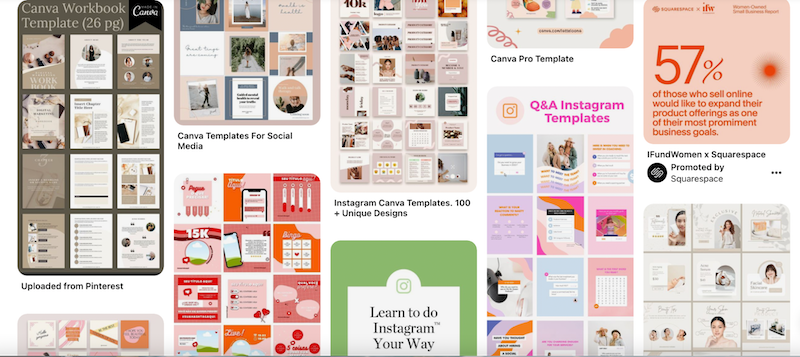
Before designing anything, understand who your buyer is and what they need. If you are creating templates for real estate agents, look at what real estate agents are posting on social media. What content do they share? What design style do they prefer? What information do they need to communicate? Browse Etsy and Creative Market to see what templates in your niche are already selling well. Read reviews to understand what buyers love and what they wish was different.
Design With Editability in Mind
The whole point of a template is that the buyer can customize it. Design your templates so that text, images, and colors can be easily changed without breaking the layout. Use placeholder text that clearly indicates what should go where. Group elements logically so they can be moved together. Avoid using free Canva elements that might not be available to all users. If you use Canva Pro elements, make sure to note this in your product listing.
Create Cohesive Collections
Instead of selling individual templates, create collections of 10 to 50 templates that share a consistent design language. A "Minimalist Instagram Feed" pack with 30 coordinated post templates is far more valuable and sellable than 30 random, unrelated designs. Cohesive collections let buyers maintain a consistent brand aesthetic across all their content.
Include Multiple Color Variations
One way to add significant value to your template pack is to include color variations. Create each design in 3 to 5 different color schemes so buyers can choose the palette that matches their brand. This is easy to do in Canva and dramatically increases the perceived value of your product.
Write Clear Instructions
Include a brief guide explaining how to access and edit the templates in Canva. Not all buyers are Canva experts. A simple PDF or video showing how to open the template link, customize text and images, and export the finished design will reduce support requests and improve customer satisfaction.
How to Share and Deliver Canva Templates
Delivering Canva templates to buyers is straightforward, but there are a few methods to understand.
The primary method is through Canva template links. In Canva, click "Share" on your design, then select "Template Link." This generates a URL that, when clicked, creates a copy of your design in the buyer's Canva account. This is the cleanest delivery method and works for both free and Pro Canva users (as long as you do not use Pro only elements).
You can also share templates through the Canva Brand Kit feature if you have Canva for Teams. This gives you more control over how templates are shared and branded.
For delivery, compile all your template links into a clean PDF document that serves as both a catalog and delivery file. Include a thumbnail preview of each template alongside its corresponding link. When selling through Storelib, this PDF is delivered instantly to the buyer upon purchase. You can also include the template links directly in the product's digital delivery files.
Pricing Your Canva Templates
Canva template pricing depends on the category, quantity, and target market.
Small packs of 5 to 10 templates typically sell for $7 to $15. These work well as entry level products that get new customers into your ecosystem.

Medium packs of 15 to 30 templates are the sweet spot for most sellers, priced at $15 to $29. These offer enough variety to be genuinely useful while providing strong profit margins.
Large collections of 50+ templates or comprehensive bundles sell for $29 to $69. These premium offerings provide massive value and attract buyers who want a complete solution.
Industry specific templates often command higher prices because they solve specialized problems. A real estate social media template pack can sell for $29 to $49 because real estate agents understand the value of professional marketing materials.
Consider offering a mega bundle that includes all your template packs at a significant discount. A "Complete Social Media Toolkit" priced at $79 that includes $200 worth of individual packs is a compelling offer that drives high average order values.
Best Platforms to Sell Canva Templates
Storelib
Storelib is ideal for Canva template sellers who want maximum control and minimum fees. Set up your store in minutes, upload your template delivery PDFs, add beautiful preview images showing your templates in action, and start selling. Storelib handles instant delivery so buyers get their template links immediately after purchase.
The OnePage feature is perfect for template sellers who market on Instagram and TikTok. Your link in bio becomes a beautiful showcase of all your template collections. Buyers can browse and purchase directly from your OnePage without navigating to a separate website. Your products also appear on Storelib's marketplace for additional organic discovery.
Fees start at 6% plus $0.25 on the free plan and drop to 3% plus $0.25 on the Growth plan at $29 per month. That is dramatically less than Etsy's 12% to 15% or Creative Market's 50%.
Etsy
Etsy is the largest marketplace for Canva templates. The built in traffic is excellent, especially for social media templates and business branding kits. Fees total 12% to 15% per sale, with additional Offsite Ads fees for larger sellers. Many template sellers use Etsy for discovery and then build their own store for direct sales.
Creative Market
Creative Market caters to a more design savvy audience. The 50% commission is the highest in the industry, but the buyers tend to spend more per purchase and value quality over price.
Canva Creators Program
Canva has its own creator program where approved designers can sell templates directly within the Canva platform. This gives you access to Canva's entire user base, but the approval process is selective and the revenue share terms may limit your earnings compared to selling independently.
Marketing Strategies for Canva Template Sellers
Instagram is your primary channel. Post examples of your templates being used in real scenarios. Create Reels showing the customization process. Use carousel posts to showcase multiple templates from a single pack. The visual nature of Instagram is perfectly suited to selling design templates.
TikTok drives massive sales for template sellers. "Watch me customize" videos, template reveal videos, and design tips that naturally showcase your products perform exceptionally well. Many Canva template sellers report that TikTok is their number one sales driver.

Pinterest is a goldmine for Canva templates. Create pins showing your templates in mockup settings and link directly to your product pages. Pinterest users are actively searching for design solutions, making it one of the highest converting platforms for template sellers.
Free templates as lead magnets. Offer a small set of free templates in exchange for an email address. This builds your list and lets potential buyers experience your design quality before committing to a purchase. On Storelib, you can list free products alongside paid ones seamlessly.
YouTube tutorials. Create Canva tutorial videos that naturally feature your templates. "How to Create Professional Instagram Posts in Canva" is the kind of video that attracts your exact target audience. Include links to your template packs in the description.
Scaling Your Canva Template Business
Once your first template pack starts selling, here is how to grow.
Expand into new niches. If your fitness Instagram templates are selling well, create fitness Pinterest templates, fitness presentation templates, and fitness ebook templates. If your real estate templates take off, expand into property management templates and real estate social media content calendars.
Create seasonal and trending content. Holiday themed templates, seasonal social media packs, and templates tied to current design trends keep your catalog fresh and give you marketing opportunities throughout the year.
Offer custom template services. Once you have established credibility through your template products, offer custom template creation as a premium service. This can command $200 to $1,000+ per project and diversifies your revenue.
Build a community. Create a Facebook group or online community for your customers where they can share how they use your templates, ask questions, and connect with each other. A community increases customer loyalty and generates word of mouth referrals.

Final Thoughts
Canva templates are one of the most accessible and scalable digital products you can sell. The tools are free, the market is enormous, and the delivery is seamless. Whether you are a graphic designer looking for passive income or a complete beginner exploring digital products for the first time, Canva templates offer a proven path to online revenue.
Start with one template pack that serves a specific audience. Make it beautiful, make it useful, and get it in front of the right people. Then build from there. Sign up for Storelib for free and launch your Canva template store today.

More in Getting Started
Start your online business!
Turn your digital creations into income. Launch your store in minutes, no credit card required.